Get Rich or Die TTYing – Part 3: The Console Class
This is the third post in a series where I explore everything you can (and perhaps sometimes shouldn’t) do with Rich – a Python library for styling terminal output. Oh, and everyone’s favourite mid-2000s rapper is along for the ride. My last two posts covered blinging up the REPL and console markup.
Today’s post is all about the Console class — the foundation for all the
really interesting things you can do with Rich.
“People judge you by appearances, the image you project through your actions, words, and style.
— 50 Cent, The 50th Law
Overview
Much like 50 Cent’s limited edition Xbox released alongside his
third-person shooter 50 Cent: Bulletproof, the Console isn’t the main
event, but it underpins all the fun and games you see on screen.
To do this, it detects the size and capabilities of the terminal it’s running in and generates the necessary ANSI escape sequences to style any output. Typically, there will only be a single instance of this class.
Your program’s output will be made up renderables in Rich’s terminology. A renderable is just that – something that can be rendered for display. It could be a string, a column, a table, a markdown block, a progress bar, or any other built-in renderable Rich provides. Moreover, renderables can be nested, meaning you can do things like put styled text and syntax-highlighted code blocks in a table. It’s the Console object’s job to work out how these components fit together and tell your terminal emulator what to display.
When is it worth using Console?
For one-off scripts and small programs, it may not be necessary to create a
Console object – using Rich’s print() function + console markup will probably
be enough. But, as soon as you need anything more complicated – drawing tables,
creating progress bars, justifying text – or you just want to modify the
behaviour of print(), you’ll need a Console object.
Since I’ll be taking you to the eye-candy shop in future posts, I’ll limit the rest of this discussion to a couple of quality-of-life improvements you get once you start using a Console object to handle your output.
Customising print()
As alluded to above, sometimes you’ll find overloading Python’s built-in
print() function a little limiting. While it’s great that Rich provides a
drop-in replacement with the same function signature, Rich’s print() doesn’t
always behave the way you want it to.
For example, Rich will automatically highlight patterns in text like numbers, booleans and collections. Normally, this is really handy. Sometimes, though, it’s distracting. Take the following:
from rich import print

print('"In da club" by 50 Cent')
Which produces:

Both the quoted string and the number in 50’s name have been highlighted in different colours, which is not what we want. Of course, it’s possible to specify the output colour of this line using console markup, but it’s a hassle and you would have to repeat the process every time you invoke this rap icon’s name.
Instead, we can use the print() method on our Console object, which allows for
customisation.
from rich.console import Console

console = Console()

console.print('"In da club" by 50 Cent', highlight=False)
Output:

In fact, we can go further and disable it globally with
console = Console(highlight=False), so that it needs to be explicitly enabled
when printing.
Exporting terminal output
The Console object is also capable of exporting everything it prints/logs as
HTML and SVG, which is great for when you want to share fancy terminal output
with your crew. To do so, your Console object first needs to be initialised with
record=True. Then, before your program exits, call either save_html() or
save_svg().
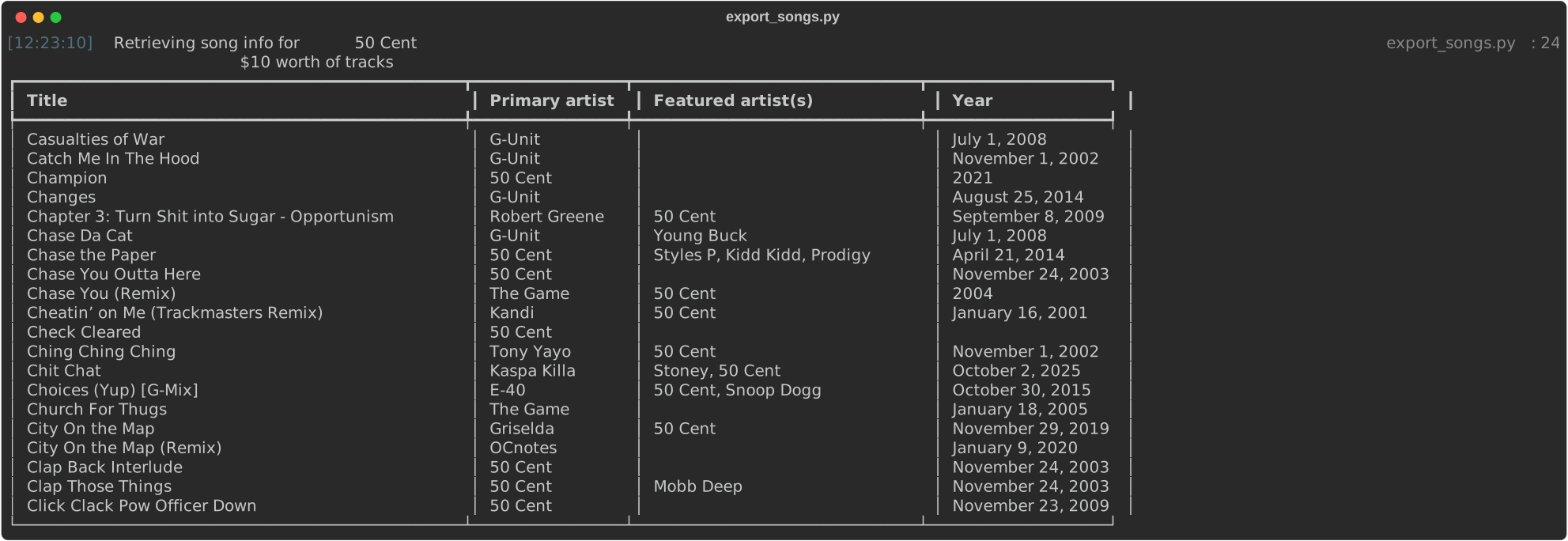
To demonstrate, I’ve put together a slightly more involved example. The script
export_songs.py queries the Genius API and prints a page of results1
as a table, before saving the output as an SVG.
 1import json
 2import os
 3import requests
 4
 5from rich.console import Console
 6from rich.table import Table
 7
 8
 9def format_featured(featured: list[dict]) -> str | None:
10    """Return all featured artists as a comma separated string"""
11    if featured:
12        artists = [artist.get("name") for artist in featured]
13        return ", ".join(artists)
14    return None
15
16
17def main() -> None:
18    console = Console(record=True, highlight=False)
19    token = os.environ["GENIUS_TOKEN"]
20
21    # '108' is 50 Cent's artist id on Genius
22    url = "https://api.genius.com/artists/108/songs?page=10"
23    headers = {"Authorization": f"Bearer {token}"}
24    console.log("Retrieving song info for [i]50 Cent[/]")
25    r = requests.get(url, headers=headers)
26
27    songs = json.loads(r.text).get("response").get("songs")
28    table = Table(title="$10 worth of tracks")
29    column_names = ["Title", "Primary artist", "Featured artist(s)", "Year"]
30
31    for name in column_names:
32        table.add_column(name)
33
34    for song in songs:
35        table.add_row(
36            song.get("title"),
37            song.get("primary_artist_names"),
38            format_featured(song.get("featured_artists")),
39            song.get("release_date_for_display"),
40        )
41
42    console.print(table)
43    console.save_svg("ten-dollar-tracks.svg", title="export_songs.py")
44
45
46if __name__ == "__main__":
47    main()
Here’s the result:
(The same script using save_html() produces this instead.)
As you can see, the output from both console.log() and console.print()
(lines 24 and 42, respectively) made its way into the export. Also note that
print() was passed a renderable – the table – instead of a plain old string.
If writing the blog series has taught me anything, it’s that generating high quality visuals of terminal output is surprisingly hard. Screenshots look terrible and dedicated tools like freeze and vhs still require quite a bit of tweaking. So I’m grateful Rich supports export to multiple formats out of the box.
Conclusion
To sum up, a Console object acts as canvas for your application and abstracts away the weird, low-level details of drawing stuff to the terminal. This gives you more space to think of ways to P.I.M.P. up your output with Rich’s renderables. It also gives you complete control of the output itself, which can then be captured/exported if desired.
For a more detailed look at everything the Console class can do, refer to the
Console API documentation – it’s more comprehensive but unfortunately
makes no reference to 50 Cent (or even G-Unit) at all.
-
I picked the tenth page arbitrarily. ↩︎